The FIFINE XLR/USB Dynamic Microphone for Podcast Recording review centers on a creator-friendly dynamic mic that pairs plug-and-play USB controls with an XLR connection for a more involved recording setup.
Its appeal is flexibility: it can serve a desktop streaming routine today, while the connection options and stand threads give it room to adapt as a home studio changes.
FIFINE AM8 Microphone Review Summary
The quick verdict
12,000+ ratings
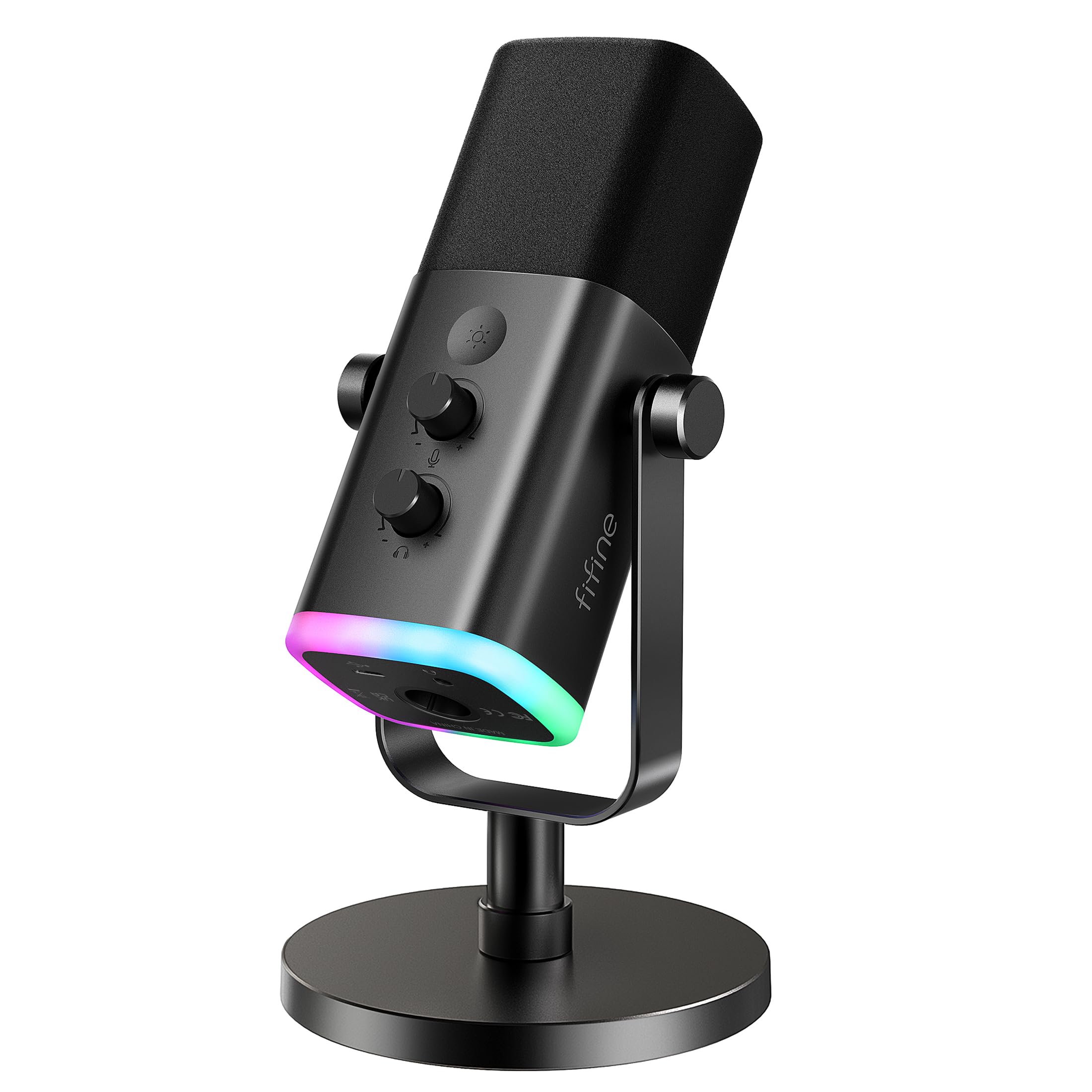
Read Amazon ReviewsFIFINE AmpliGame AM8
A practical fit for new podcasters, streamers, and gamers who want USB convenience now with an XLR path for a later studio setup.
- Dynamic cardioid microphone with a 50 Hz–16 kHz frequency response and end-address pickup orientation.
- USB connection supports plug-and-play use and provides access to the mute button, gain knob, headphone jack, headphone volume control, and RGB functions.
- XLR connection can be used with an audio interface or mixer; a separate XLR cable is required.
- The mute control has an LED reminder, while the RGB ring offers three modes and more than ten colors in USB mode.

Pros
- Offers both USB convenience and an XLR connection option for a changing recording setup.
- Places mute, gain, and headphone monitoring controls on the microphone for USB sessions.
Consider before buying
- The XLR cable is separate, and XLR use requires an interface or mixer.
- RGB lighting and the microphone’s function key are inactive in XLR mode.
Read the full review summary
The AmpliGame AM8 brings together the controls many solo creators want close at hand: a mute button, gain adjustment, headphone monitoring, and configurable RGB lighting over USB.
Its cardioid dynamic design, end-address pickup, and suggested 2–6 inch recording distance make mic placement part of the setup; keeping the top aimed toward the speaker should help the mic focus on the intended voice rather than sound from other directions.
For a first podcast or streaming mic, USB keeps the connection straightforward, and the headphone output offers a direct way to monitor.
XLR creates another connection route for use with an interface or mixer, but requires a separate XLR cable and an external audio device.
The USB-only functions do not carry over to XLR, so the AM8 suits buyers who value having both workflows more than buyers who expect every onboard convenience to work in either mode.
The buying factors
FIFINE AM8 Microphone Scorecard
Editorial scores reflect listed features and buyer fit; they are not laboratory measurements or customer ratings.
Connection flexibility
USB and XLR accommodate a simple desktop start and a later interface-based setup, though XLR requires separately supplied gear.
USB controls
Mute, gain, headphone monitoring, and RGB controls are built around USB use.
Voice-focused design
The cardioid dynamic format and end-address orientation suit close spoken-word recording when positioned as intended.
Setup simplicity
USB is described as plug and play, making it accessible for creators who do not want to begin with an interface.
Mounting flexibility
Built-in 3/8-inch and 5/8-inch threads are intended to fit many microphone stands without an adapter.
Visual customization
USB mode offers three RGB modes and more than ten color options, with the selected lighting remembered after power-off.
Key Features and Specifications of FIFINE AM8 Microphone
- Dynamic cardioid microphone with a 50 Hz–16 kHz frequency response and end-address pickup orientation.
- USB connection supports plug-and-play use and provides access to the mute button, gain knob, headphone jack, headphone volume control, and RGB functions.
- XLR connection can be used with an audio interface or mixer; a separate XLR cable is required.
- The mute control has an LED reminder, while the RGB ring offers three modes and more than ten colors in USB mode.
- Built-in 3/8-inch and 5/8-inch metal threads are designed to fit many microphone stands without an external adapter.
- A windscreen cover is included, and the suggested recording distance is 2–6 inches with the top aimed toward the sound source.
Pros and Cons of FIFINE AM8 Microphone
Pros
- Offers both USB convenience and an XLR connection option for a changing recording setup.
- Places mute, gain, and headphone monitoring controls on the microphone for USB sessions.
- Includes adjustable RGB lighting with memory for the selected effect.
- Stand threads accommodate common 3/8-inch and 5/8-inch mounts.
Consider before buying
- The XLR cable is separate, and XLR use requires an interface or mixer.
- RGB lighting and the microphone’s function key are inactive in XLR mode.
- The suggested 2–6 inch working distance calls for close placement, which may take some desk or stand adjustment.
Who Should Buy FIFINE AM8 Microphone?
Good fit
Consider the AM8 if you are starting a podcast, stream, or voice recording routine and want a direct USB setup with essential controls close at hand.
The mute button and LED reminder can be useful during live sessions, while the headphone connection and volume control let you listen from the mic rather than relying only on software controls.
It also makes sense if you want an XLR option for an interface or mixer in a future setup.
Before choosing that route, account for the separate cable and external audio device, and decide whether losing the USB-only RGB and function-key controls in XLR mode fits your workflow.
The built-in stand threads give the mic some mounting flexibility. Check the position of your desk, stand, and speaking posture before buying, since the suggested close distance and top-facing pickup orientation are central to using it as intended.
Who should skip it
Look elsewhere if your recording routine depends on having the RGB and function key available while connected through XLR. Those controls are specifically tied to USB use.
It may not suit a setup where the microphone needs to sit far from the speaker. Its suggested recording range is close, so consider whether your stand and desk can place it comfortably within that range.
How the FIFINE AM8 Microphone fits a creator setup
USB is the simplest starting point
The USB connection is the straightforward route for a new desktop recording setup.
Mute, gain, headphone monitoring, and lighting controls are available on the mic in this mode, which keeps several routine adjustments within reach while recording or streaming.
XLR adds a different workflow
XLR offers a path to connect through an audio interface or mixer, which can be useful when a creator’s recording setup grows beyond a direct computer connection.
That route depends on separately obtaining an XLR cable and using the external device; the AM8’s USB-specific function key and RGB controls are inactive over XLR.
Close positioning shapes the result
The cardioid dynamic design is intended to pick up sound from the front, and the suggested placement is 2–6 inches away with the top facing the source.
This makes a stable stand position important for spoken content, particularly if the mic must stay out of the way of a keyboard, screen, or other desk gear.
Mounting and appearance are practical details
The built-in 3/8-inch and 5/8-inch threads are designed to fit many microphone stands without an external adapter, while the included desktop stand supports a desk-based starting point.
USB lighting adds a customizable visual element, but it is best treated as a setup detail rather than a reason to choose the mic if XLR will be the regular connection.
Alternatives to FIFINE AM8 Microphone
Multipurpose Dynamic Microphones alternative
5,000+ ratings
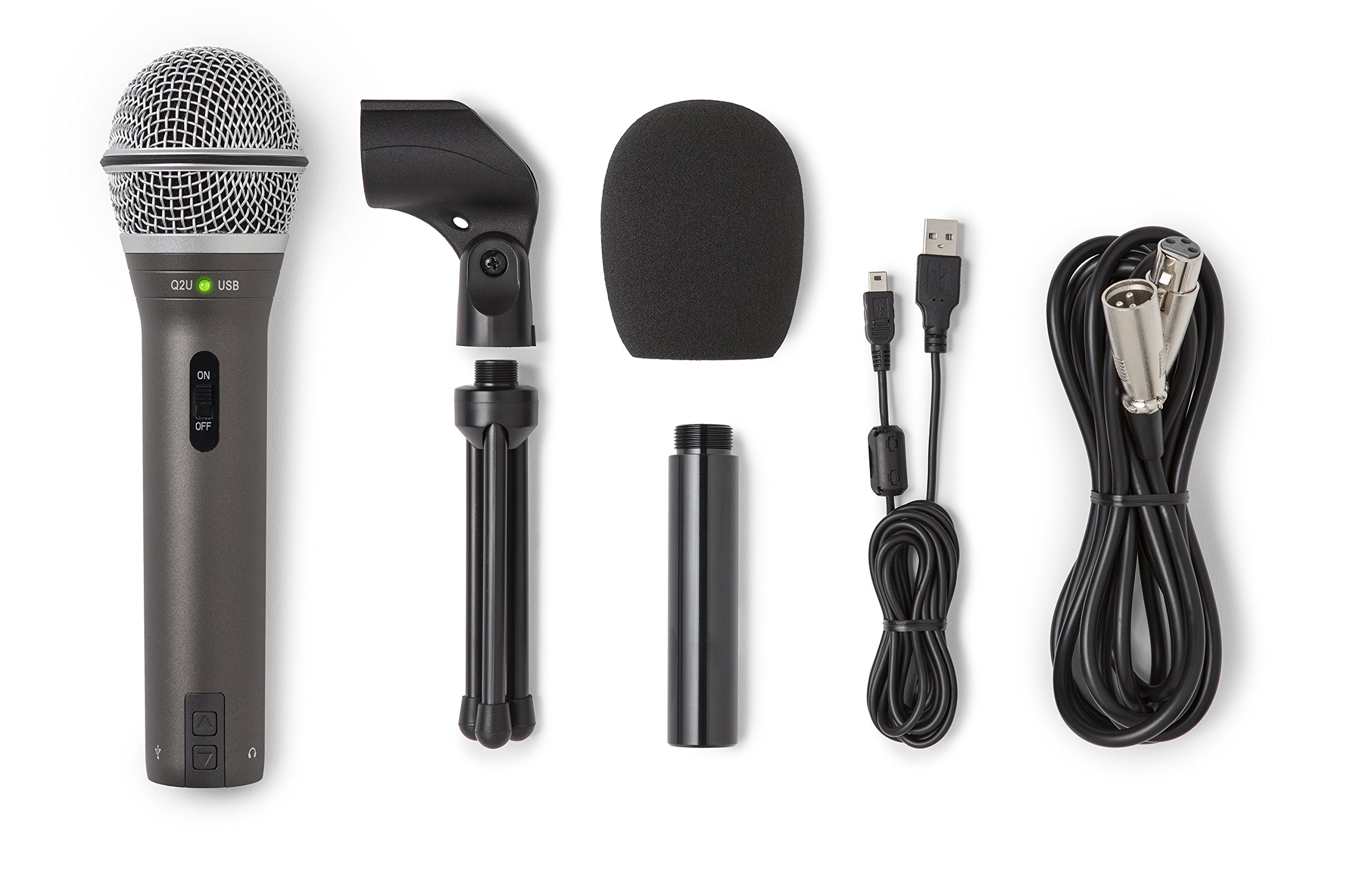
Read Amazon ReviewsSamson Q2U USB/XLR Dynamic Microphone
Consider the Q2U if a supplied USB-C and XLR cable and a handheld form are more useful to your recording kit.
The AM8 is the better fit if you specifically want its USB lighting and onboard gain, mute, and headphone controls.
- The Q2U is a handheld USB-C/XLR dynamic microphone supplied with a desktop tripod stand, tripod extension, mic clip, windscreen, USB-C cable, and XLR cable.
- The AM8 offers USB-based RGB lighting, gain and headphone controls, and a suggested close recording distance, while its XLR cable is separate.
Multipurpose Dynamic Microphones alternative
600+ ratings
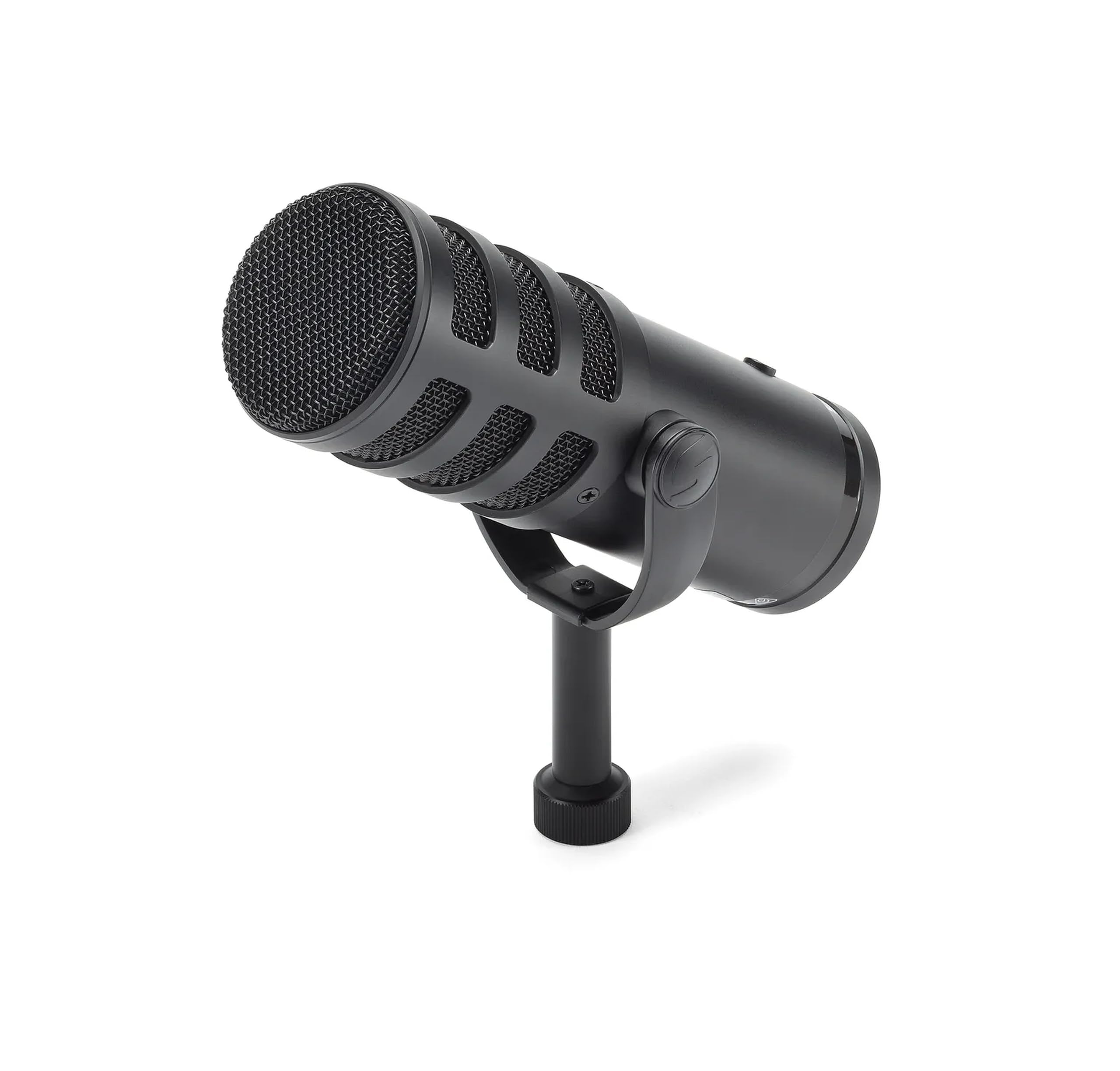
Read Amazon ReviewsSamson Q9U XLR/USB Dynamic Broadcast Microphone
The Q9U may fit a buyer prioritizing high-definition USB recording and headphone monitoring across a broadcast-focused setup.
The AM8 is a more suitable match when RGB customization and its USB gain control are central to a desktop gaming or streaming routine.
- The Q9U offers XLR and USB-C connections, 24-bit/96 kHz digital recording over USB, zero-latency headphone monitoring, a mute switch for both outputs, and an internal pneumatic shock mount.
- The AM8 provides RGB and its function key over USB, but these features are inactive when using XLR.
Is FIFINE AM8 Microphone Worth It?
The FIFINE AmpliGame AM8 is worth considering for a new streamer, gamer, or podcaster who wants a direct USB setup with physical controls and the option to move to XLR later.
Its close-positioned cardioid design, stand threads, and headphone monitoring support a practical desktop recording routine.
The main buying decision is how you expect to connect it. USB unlocks its onboard controls and lighting; XLR needs a separate cable and interface or mixer, and leaves the RGB and function key inactive.
If those tradeoffs fit your setup, the AM8 is a versatile entry point for home voice recording.
Your review at a glance
12,000+ ratings
Read Amazon ReviewsFIFINE AmpliGame AM8
A practical fit for new podcasters, streamers, and gamers who want USB convenience now with an XLR path for a later studio setup.
- Dynamic cardioid microphone with a 50 Hz–16 kHz frequency response and end-address pickup orientation.
- USB connection supports plug-and-play use and provides access to the mute button, gain knob, headphone jack, headphone volume control, and RGB functions.
- XLR connection can be used with an audio interface or mixer; a separate XLR cable is required.
- The mute control has an LED reminder, while the RGB ring offers three modes and more than ten colors in USB mode.