The MAONO Gaming Audio Mixer review starts with a clear fit: the MaonoCaster G1 NEO brings XLR microphone support, stream-friendly controls, voice effects, and RGB lighting into a compact setup.
It suits gamers and newer streamers who want hands-on audio features, provided they do not rely on a USB microphone or Xbox.
MaonoCaster G1 NEO Review Summary
The quick verdict
1,000+ ratings
Read Amazon ReviewsMAONO MaonoCaster G1 NEO
A compact streaming mixer for gamers and new creators who use an XLR microphone and want built-in effects, RGB lighting, and simple audio controls.
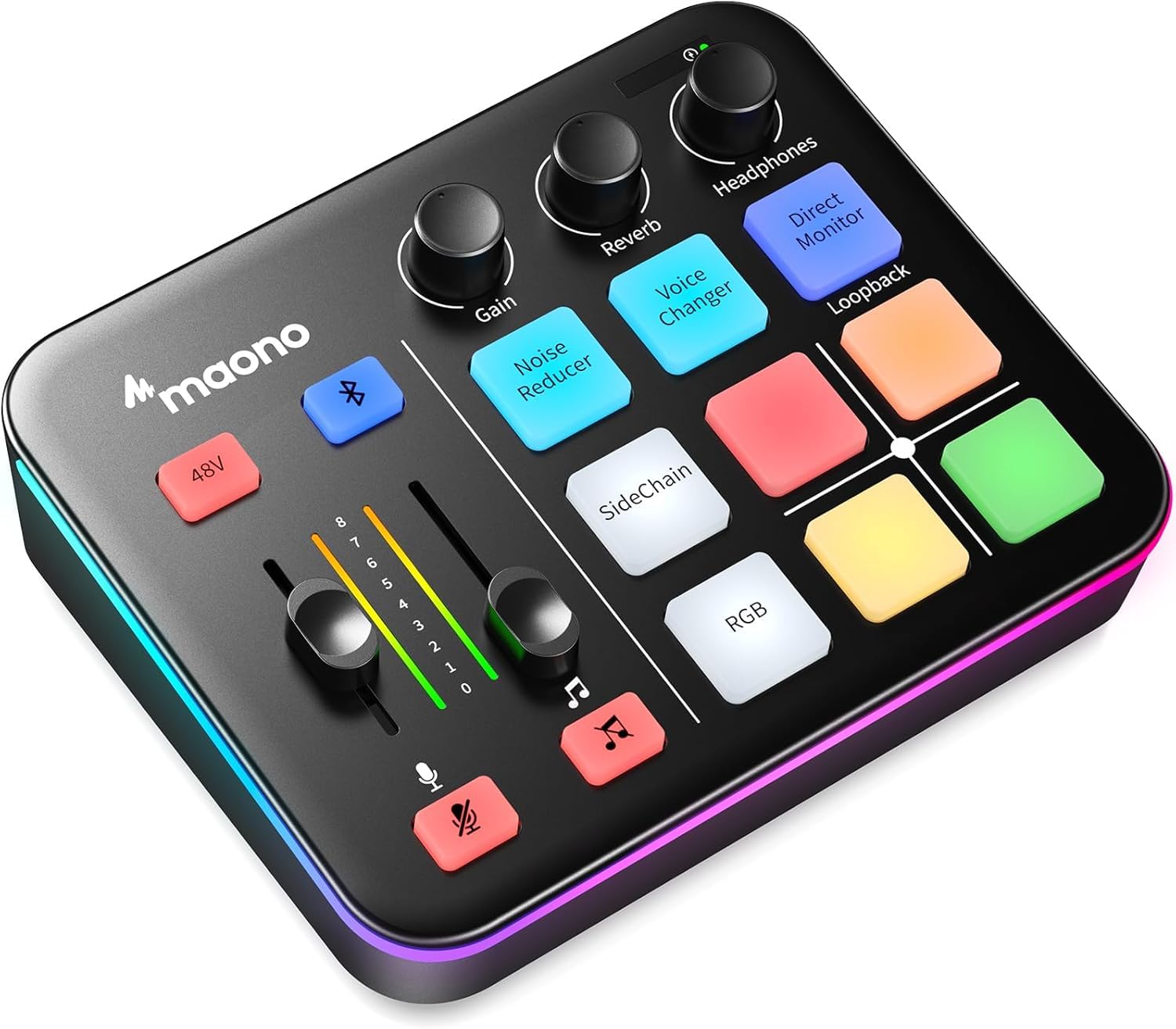
- XLR microphone input support with a built-in preamp and 48V phantom power for condenser microphones; phantom power should remain off for XLR dynamic microphones.
- Listed gain range of -45 dB to -55 dB, with separate gain, volume, and headphone controls for setup adjustments.
- One-click mute, loopback, direct monitoring, noise reduction, voice changing, reverb, and sidechain features.
- Custom sound pads for adding voice tags or other sound effects during streams.

Pros
- Combines microphone support, monitoring, mute, and loopback controls in a compact streaming-focused unit.
- Offers several ways to add personality through voice effects, custom sound pads, reverb, and sidechain.
Consider before buying
- Not suitable for USB microphones, Xbox, or MAONO devices, so check the exact microphone and gaming platform before buying.
- The listed controls require setup adjustments for gain, volume, and headphone level; buyers seeking fully automatic levels may prefer a simpler plug-and-play path.
Read the full review summary
The G1 NEO is designed to make a streaming audio setup easier to manage from one device.
Its built-in preamp and 48V phantom power support XLR microphones, while one-click mute, direct monitoring, loopback, Bluetooth accompaniment, and programmable sound pads cover common streaming tasks.
Voice effects, reverb, sidechain, and customizable RGB add options for creators who want a more playful on-stream presentation.
This mixer is most relevant to gamers, new streamers, and podcasters building around an XLR microphone and a computer, phone, tablet, or PlayStation 4 or 5.
The key buying check is compatibility: it is not for USB microphones, Xbox, or MAONO devices.
Buyers should also be comfortable setting microphone gain and monitoring levels themselves, since the product calls for adjusting its gain, volume, and headphone controls after setup.
The buying factors
MaonoCaster G1 NEO Scorecard
Editorial scores reflect listed features and buyer fit; they are not laboratory measurements or customer ratings.
XLR microphone support
A built-in preamp and switchable 48V phantom power make the mixer a practical control point for compatible XLR microphones.
Streaming controls
One-click mute, loopback, and direct monitor activation address useful live-stream tasks.
Sound customization
Voice changing, sound pads, reverb, and sidechain provide several ways to shape a stream's sound.
Setup simplicity
The interface is presented as intuitive, although buyers still need to configure gain and volume for their microphone and headphones.
Device compatibility
Support spans several phones, computers, tablets, and PlayStation consoles, but USB microphones and Xbox are excluded.
Desk and stream presentation
A compact design and 12 RGB color variations give the unit a streamer-focused footprint and appearance.
Key Features and Specifications of MaonoCaster G1 NEO
- XLR microphone input support with a built-in preamp and 48V phantom power for condenser microphones; phantom power should remain off for XLR dynamic microphones.
- Listed gain range of -45 dB to -55 dB, with separate gain, volume, and headphone controls for setup adjustments.
- One-click mute, loopback, direct monitoring, noise reduction, voice changing, reverb, and sidechain features.
- Custom sound pads for adding voice tags or other sound effects during streams.
- Bluetooth accompaniment input for adding audio to a stream.
- RGB buttons and body light strips with 12 color variations, including solid, gradient, and rainbow effects.
- Compatible devices include phones, computers, tablets, PS4, and PS5; listed software includes OBS, Discord, Twitch, TikTok, YouTube, Facebook, Streamlabs, Streamyard, and Zoom. It is not for USB microphones, Xbox, or MAONO devices.
Pros and Cons of MaonoCaster G1 NEO
Pros
- Combines microphone support, monitoring, mute, and loopback controls in a compact streaming-focused unit.
- Offers several ways to add personality through voice effects, custom sound pads, reverb, and sidechain.
- Switchable 48V phantom power accommodates XLR condensers while the instructions specify leaving it off for XLR dynamics.
- Bluetooth accompaniment and a broad list of streaming software support flexible creator setups.
Consider before buying
- Not suitable for USB microphones, Xbox, or MAONO devices, so check the exact microphone and gaming platform before buying.
- The listed controls require setup adjustments for gain, volume, and headphone level; buyers seeking fully automatic levels may prefer a simpler plug-and-play path.
- The product description does not detail the sound-pad workflow or how effects are assigned, so consult the manual if those controls are central to your setup.
Who Should Buy MaonoCaster G1 NEO?
Good fit
Consider the MaonoCaster G1 NEO if you already use, or plan to use, an XLR microphone and want streaming controls within reach.
The built-in preamp and phantom power make it relevant to condenser microphone setups, while the guidance to keep phantom power off for dynamic XLR microphones gives users a clear starting point for that choice.
Its feature mix is especially appealing if you want to handle mute, direct monitoring, loopback, and sound effects without relying entirely on software controls.
Bluetooth accompaniment, voice changing, reverb, and custom sound pads can also support a more interactive stream, while RGB options let the mixer fit a gaming desk's look.
Before choosing it, confirm that your microphone and platform are compatible, and make sure its listed gain, volume, and headphone adjustments fit the way you like to configure audio.
Read the manual during setup, particularly if you intend to use phantom power or build a workflow around the sound pads.
Who should skip it
Skip this model if your microphone is USB, your console is Xbox, or your intended device is a MAONO product; those uses are expressly excluded.
It may also be a poor fit if you want a mixer without voice effects, lighting, or hands-on level adjustments.
The G1 NEO emphasizes streaming controls and customization, so compare its interface and setup steps with your preferred workflow before committing.
How the MaonoCaster G1 NEO Fits a Streaming Setup
Match the mixer to your microphone
The G1 NEO is built around XLR microphone use. Its preamp and 48V phantom power make it a candidate for an XLR condenser, and the product guidance says to leave phantom power off for XLR dynamics.
Check your microphone's connection and power requirements first; a USB microphone falls outside the intended setup.
Put live controls where you need them
One-click mute, direct monitoring, and loopback address practical needs during a stream: managing when the microphone is active, hearing audio in real time, and routing audio through the streaming setup.
The controls are useful only if they align with your software and device arrangement, so consider how you currently handle monitoring and audio capture before reorganizing around the mixer.
Choose effects for your style
Voice changing, sound pads, reverb, and sidechain give the G1 NEO a more entertainment-oriented profile than a basic microphone control box.
These options may be useful for gaming streams, audience interaction, or adding a vocal moment, but they are secondary if your main priority is straightforward voice capture.
Check the manual for the sound-pad setup that matches your intended use.
Check the whole device chain
Compatibility spans phones, computers, tablets, and PS4 and PS5, as well as named streaming and communications software.
That breadth does not mean every combination works identically: verify the platform, microphone, and software you plan to use together, especially if your setup includes an excluded USB microphone or Xbox.
Alternatives to MaonoCaster G1 NEO
No alternative model is recommended here. Compare the design and features that matter to your routine before choosing another option.
Is MaonoCaster G1 NEO Worth It?
The MAONO MaonoCaster G1 NEO is worth considering for gamers and newer creators who want a compact, hands-on streaming mixer built around an XLR microphone.
Its mix of phantom power, monitoring and routing controls, voice effects, sound pads, and Bluetooth accompaniment gives it more to offer than simple microphone level adjustment.
Buy it when your microphone and platform fit the listed compatibility and you value its stream-focused controls and customization.
Pass if you use USB microphone or Xbox equipment, or if you would rather avoid manual audio setup and extra effects.
Your review at a glance
1,000+ ratings
Read Amazon ReviewsMAONO MaonoCaster G1 NEO
A compact streaming mixer for gamers and new creators who use an XLR microphone and want built-in effects, RGB lighting, and simple audio controls.
- XLR microphone input support with a built-in preamp and 48V phantom power for condenser microphones; phantom power should remain off for XLR dynamic microphones.
- Listed gain range of -45 dB to -55 dB, with separate gain, volume, and headphone controls for setup adjustments.
- One-click mute, loopback, direct monitoring, noise reduction, voice changing, reverb, and sidechain features.
- Custom sound pads for adding voice tags or other sound effects during streams.